TL;DR
A solar backup power station is a rechargeable battery system that can run selected devices during an outage and recharge from compatible solar panels, an outlet, or a vehicle. Choose by matching its usable watt-hours and continuous and surge output to your actual loads; solar recharge time varies with sunlight, panel setup, and the station’s input limits.
Capacity in watt-hours estimates stored energy; actual usable energy is lower because of operating and conversion losses.
Check continuous and surge output separately, especially before connecting a refrigerator or other motor-driven appliance.
Solar-panel ratings assume ideal conditions; shade, angle, temperature, weather, and the station’s input limit affect charging.
Use compatible transfer equipment and a qualified electrician for any connection to home circuits.
Follow the maker’s storage, temperature, and charging guidance to care for the battery.

Get backup power and energy gear delivered free with Prime
- Fast, free delivery on millions of items
- Prime Video, Amazon Music and more included
- Member-only deals all year
What a solar backup power station can run during an outage
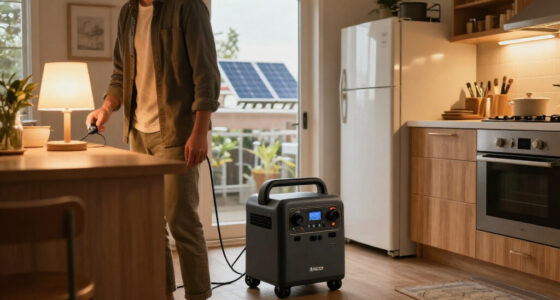
A solar backup power station is a portable battery system that stores electricity for use when grid power is unavailable or when you are away from an outlet. Most units pair a rechargeable battery with an inverter for household-style AC outlets and ports for USB or DC devices. For example, a small station may keep your phone, router, and LED lamp running while a larger model can support selected appliances. The phrase “solar generator” usually describes a battery station that can recharge from solar panels. The station does not make sunlight into electricity on its own; you need compatible panels. It can often also recharge from a wall outlet or vehicle outlet, which gives you options when clouds settle in or the sun goes behind the trees. A portable battery is useful because it supplies electricity without fuel combustion at the point of use. That makes it quieter than a fuel generator for a laptop or bedside lamp. Still, it stores a finite amount of energy. If you run a heater or air conditioner, that reserve can drain quickly. Think of the station as a water tank with a faucet: capacity is the amount stored, while output is how much you can draw at once. A tank may hold plenty, yet a narrow faucet cannot supply a demanding appliance. That distinction is why “system that stores” electricity describes only part of what a power station does.Products Worth Considering

Philips Hue Bridge Pro Smart Lighting Hub, 1-Pack

Ring Alarm 5-Piece Home Security Kit

Shark Rocket Pet Plus Corded Stick Vacuum, Bordeaux/Silver, HV322
As an affiliate, we earn on qualifying purchases.
How to size a station for the devices you need
To size a solar backup power station, list the devices you want to run, note their power in watts, and estimate how many hours you’ll use each one. Then compare the total energy need with usable battery capacity and check that the station’s output can handle the devices together. For instance, a 60-watt router running for 8 hours uses about 480 watt-hours before conversion losses. Start with these steps:- Write down the loads. Include everyday items such as phones, lights, a modem, or a medical device.
- Estimate energy. Multiply each device’s watts by its expected hours of use. A 10-watt lamp used for 5 hours needs about 50 watt-hours.
- Check output limits. Add the watts of items you might run at the same time, and check surge ratings for motors and compressors.
- Allow for losses. Usable energy will be lower than the capacity printed on the case because the inverter and system use some power.
Why capacity and output tell you different things
Capacity tells you how much energy a station can store; output tells you how much power it can deliver at one time. You need both numbers to judge a model. A high-capacity unit with modest output might run a lamp for many hours but fail to start a motor that needs a strong initial surge.| Specification | What it tells you | Example to check |
|---|---|---|
| Capacity (Wh) | Stored energy, with less available after system losses | Could the unit cover a router and light through the evening? |
| Continuous output (W) | Power it can supply steadily | Can it run the devices you plan to use together? |
| Surge output (W) | Short-term power available for startup loads | Can it handle a refrigerator compressor starting? |
| Solar input | Panel voltage, current, and power limits | Will your panel fall within the station’s specified range? |
When solar panels will recharge your station
Solar charging time depends on the battery’s size, panel output, sunlight, positioning, and the station’s solar-input limit. A panel’s wattage is a rating under ideal test conditions, not a promise of steady output on your patio. Shade from one branch, a poor angle, hot panel surfaces, or short winter days can cut production. Imagine a 200-watt panel on a clear summer day, pointed toward the sun. It may recharge much faster than the same panel laid flat under hazy skies, but actual output changes throughout the day. A station also may accept less power than the panel can produce, so check the input range before buying. Panel voltage, current, connectors, and total wattage all need to fit the unit’s specifications. Solar can extend operation during daylight, especially if you use modest loads and give the panels a sunny, unshaded spot. It cannot guarantee continuous power through cloudy weather or overnight. If you need to protect a refrigerator during a long outage, plan around the worst likely conditions, not just a bright afternoon. Keep the wall or vehicle charging option in mind when you have access to one. A practical habit: place panels where you can adjust their angle, then check the station’s input display after setup. If a nearby tree casts a sharp shadow across one panel, moving it a few feet can make a visible difference.Which battery features matter for lifespan and daily use
Battery chemistry, temperature, and storage habits affect how long a station lasts. Newer models often use lithium iron phosphate (LFP) batteries, which are generally designed for more charge cycles than conventional lithium-ion chemistries. Exact lifespan still depends on the model and how you use it, so compare the manufacturer’s cycle-life definition and warranty rather than assuming every LFP unit lasts the same number of years. A station kept in a hot garage or left empty for months may age differently from one stored within the maker’s temperature and charge guidance. Follow the manual for storage level and periodic charging. That modest routine matters when you reach for the unit after a year and expect it to work. Features such as USB-C power delivery, app monitoring, quiet operation, and expandable batteries can make a setup easier to live with. An app might show you that a fan is drawing more power than expected; expansion can add reserve for longer outages. Those extras come with tradeoffs in cost, weight, and compatibility. A heavier system may suit a home backup corner but feel awkward on a camping trip. For example, if you mainly need to charge two phones and run a reading lamp, a compact unit may be easier to store and carry than a large expandable model. If your plan includes a refrigerator, prioritize measured energy needs, surge output, and supported expansion first.How to use a station safely in your home
A portable station can supply selected devices, but it is not automatically a safe way to power a home’s wiring. Most portable units are not designed to feed electricity into house circuits through an ordinary wall outlet. Connecting to home circuits calls for compatible transfer equipment and installation that follows local electrical rules; have a qualified electrician handle that work. For a simple outage setup, plug approved devices directly into the station and follow its manual for ventilation, moisture protection, charging temperature, and operating limits. Keep it away from excessive heat and water. The station does not produce exhaust while supplying power, unlike a fuel generator, but that does not remove the need to follow charging and placement instructions. A family preparing for a storm might reserve battery capacity for a modem, a few LED lights, and phones instead of trying to power every room. That short list is easier to estimate and gives each device a clear purpose. For life-support equipment or another critical load, check with the equipment maker and plan backup options with a qualified professional.Do not plug a station into an ordinary household outlet to energize home wiring. Use only compatible equipment installed according to local electrical rules.The most useful plan is specific: name the devices, confirm their power needs, and decide which ones take priority if the outage lasts longer than expected.
What to compare before you choose a model
Compare the specifications that connect directly to your plan: usable capacity, continuous and surge output, solar-input range, charging time, battery chemistry, ports, weight, warranty, and expansion options. Labels such as “whole-home” or “solar generator” do not tell you whether a unit can run your refrigerator or accept the panel you already own. Consider a weekend cabin trip. If you need a phone, camera, and small light, portability and USB-C charging may matter more than a huge inverter. For an outage, you may care more about refrigerator startup, usable capacity, and the ability to recharge from several panels. The same station can be an excellent fit for one job and a poor fit for another. Use this quick comparison when shopping:- For phones and lights: prioritize low weight, suitable USB ports, and enough capacity for the hours you need.
- For a router and laptop: check AC and USB-C output, then estimate overnight energy use.
- For a refrigerator: check startup surge and use daily energy consumption for the runtime estimate.
- For solar charging: match panel voltage, current, connector, and wattage to the station’s input limits.