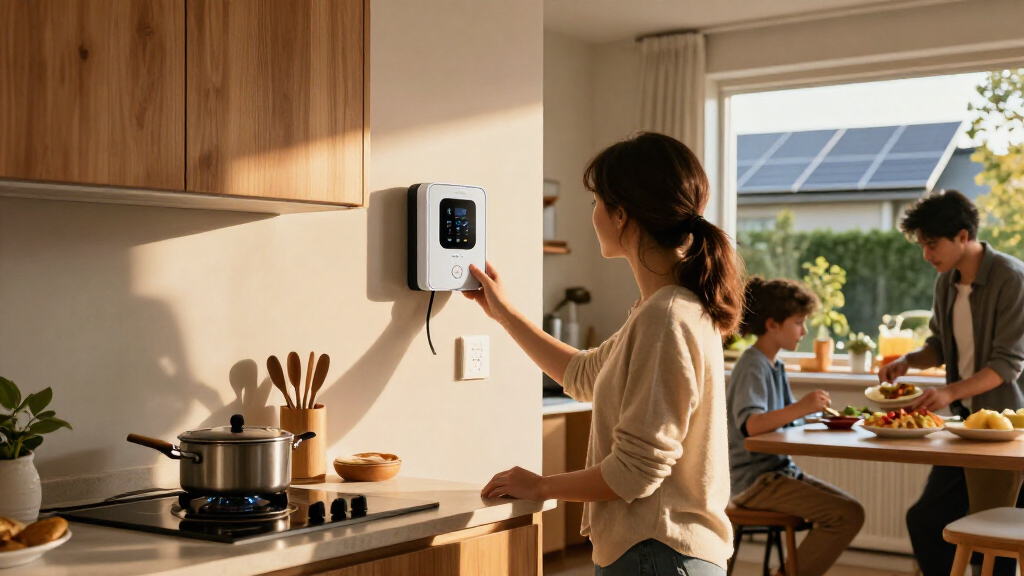

The best home electrification products depend on whether you want to automate individual appliances or understand electricity use across your home. I rank the Emporia Vue 3 as the best overall pick for whole-home visibility and automation, while the Tapo P316M stands out for monitoring several plugged-in devices from one power strip. For a simpler start, the Amazon Smart Plug adds basic voice and app control without the setup demands of an energy monitor. The main tradeoff is scope: smart plugs are easier to install, while circuit-level monitors can reveal more but require electrical-panel work. Read on for the full breakdown and help matching each option to your home and goals.

Get backup power and energy gear delivered free with Prime
- Fast, free delivery on millions of items
- Prime Video, Amazon Music and more included
- Member-only deals all year
Key Takeaways
- Whole-home insight sets the Emporia Vue 3 apart: it monitors circuits at the electrical panel, unlike the outlet-level devices in this roundup.
- The Tapo P316M bridges monitoring and convenience: its multiple outlets and energy monitoring suit a desk or entertainment area better than a single smart plug.
- Smart plugs are a lower-commitment starting point: Amazon, Linkind, Govee, and GHome focus on controlling individual devices, with differences in ecosystem support and pack size.
- The Refoss monitor favors technical control: its open API and local-use approach appeal to Home Assistant users, but may be less straightforward for app-first households.
- Not every product measures or controls energy: the Watt Meter reports an individual device’s consumption, while the Addtam extender emphasizes outlets and USB charging rather than energy data.
| Amazon Smart Plug (2-Pack) |  | Best for Simple Alexa Control | Dimensions: 3.2 × 1.5 × 2.2 in (80 × 38 × 57 mm) | Weight: 3.1 oz (87 g) | Network: 2.4 GHz, 802.11 b/g/n | VIEW LATEST PRICE | See Our Full Breakdown |
| Tapo Smart Wi-Fi Power Strip, Matter, P316M, Energy Monitoring |  | Best for Multi-Device Energy Management | AC outlets: 6 | USB ports: 3 | Voltage: 120 V | VIEW LATEST PRICE | See Our Full Breakdown |
| Linkind Matter Smart Plug, Compatible with Apple Home, Alexa, Siri, Google Home |  | Best for Cross-Platform Smart Homes | Voltage: 120 V | Plug type: North American Type B, 3-prong | Amperage: 15 A | VIEW LATEST PRICE | See Our Full Breakdown |
| Emporia Vue 3 Home Energy Monitor – Smart Home Automation Module and Real-Time Electricity Usage Monitor |  | Best for Whole-Home Circuit Monitoring | Monitoring scope: Whole-home monitor with 16 circuit sensors | Certifications: CE, UL | Weight: 4.99 lb | VIEW LATEST PRICE | See Our Full Breakdown |
| Refoss Smart Home Energy Monitor with Open API, Home Assistant, No Cloud |  | Best for Local Energy Data and Home Assistant | Model: EM16P | Main current sensors: 2 × 200 A | Branch current sensors: 16 × 1–60 A | VIEW LATEST PRICE | See Our Full Breakdown |
| Govee Smart Plug, WiFi Outlet Compatible with Alexa & Google Assistant, 4 pcs |  | Best for Multi-Room Automation | Pack size: 4 plugs | Voltage: 120 volts | Amperage: 11 A | VIEW LATEST PRICE | See Our Full Breakdown |
| Watt Meter Power Meter Plug Home Electricity Usage Monitor with 7 Modes Display |  | Best for Appliance-Level Energy Tracking | Monitoring parameters: Power, energy, voltage, amps, hertz, power factor, cost, min/max power, and cumulative time | Display size: 2.36 × 1.85 inches | Backlight settings: 10 minutes, 1 hour, 4 hours, 8 hours, or always on | VIEW LATEST PRICE | See Our Full Breakdown |
| Addtam Surge Protector, 5 Outlet Extender with Night Light and 4 USB Ports |  | Best for Charging-Dense Rooms | AC outlets: 5 | USB ports: 4, including USB-C | Maximum current: 15 A | VIEW LATEST PRICE | See Our Full Breakdown |
| GHome Smart Plug Mini, WiFi Smart Outlet Plug Works with Alexa and Google Home, Timer Outlet with APP Control, 2.4GHz Network Only, No Hub Required, ETL FCC Listed (4 Pack), White | 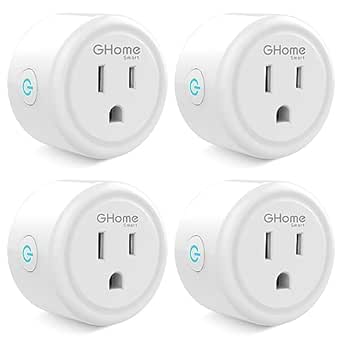 | Best Compact Smart Plug | Pack size: 4 plugs | Voltage: 120 volts | Amperage: 10 A | VIEW LATEST PRICE | See Our Full Breakdown |
| home electrification product | Dimensions | Voltage |
|---|---|---|
| Amazon Smart Plug | 3.2 × 1.5 × 2.2 in (80 × 38 × 57 mm) | — |
| Tapo Smart Wi-Fi Power Strip | 16.2 × 4.8 × 1.9 in | 120 V |
| Linkind Matter Smart Plug | — | 120 V |
| Emporia Vue 3 Home Energy Moni | 10 × 5 × 5 in | — |
| Refoss Smart Home Energy Monit | — | — |
| Govee Smart Plug | — | 120 volts |
| Watt Meter Power Meter Plug Ho | — | — |
| Addtam Surge Protector | 5.4 × 3.4 inches | 125 volts |
| GHome Smart Plug Mini | 2 × 2 × 1 inches | 120 volts |
More Details on Our Top Picks
Amazon Smart Plug (2-Pack)
I’d choose the Amazon Smart Plug when the goal is to schedule or voice-control ordinary indoor devices without adding a hub or rewiring anything. Setup is built around Alexa, and its compact shape is useful where keeping the neighboring outlet free matters. Compared with the Linkind Matter Smart Plug, this two-pack is less flexible across smart-home platforms: it works with Alexa rather than offering the broader Matter compatibility described for Linkind. It also doesn’t monitor energy use, so it can automate a lamp or small appliance but won’t show how much electricity that device consumes. The 2.4 GHz-only Wi-Fi requirement and indoor-only design further narrow its fit. I’d pick it for straightforward Alexa routines, not for cross-platform control or energy tracking.
Pros:- Works with Alexa without a separate hub
- Compact design helps preserve access to the adjacent outlet
- Supports routines and scheduling for automated device control
- Can reconnect automatically after network outages
Cons:- Requires a 2.4 GHz Wi-Fi network and does not support 5 GHz
- Limited to Alexa rather than multiple voice assistant platforms
- Indoor use only, with no energy monitoring listed
Best for: Alexa households that want simple schedules and voice control for indoor lamps or other compatible devices, without a separate hub.
Not ideal for: Buyers using Google Home or Siri, needing energy-use data, or wanting an outdoor-rated plug.
- Dimensions:3.2 × 1.5 × 2.2 in (80 × 38 × 57 mm)
- Weight:3.1 oz (87 g)
- Network:2.4 GHz, 802.11 b/g/n
- Use:Indoor only
- Pack size:2 smart plugs
- Control:Alexa voice control, routines, and scheduling
Our verdict“Choose this two-pack for uncomplicated Alexa-based control of indoor devices, but choose the Linkind Matter Smart Plug for broader platform compatibility.”
Tapo Smart Wi-Fi Power Strip, Matter, P316M, Energy Monitoring
The Tapo P316M earns its place for households that want several devices on one controllable, measurable power strip. It combines six AC outlets and three USB ports with energy monitoring, scheduling, Matter support, and local operation, making it more useful for a desk or media area than a single-outlet plug such as the Amazon Smart Plug. The monitoring can help identify which connected equipment deserves a schedule or shutdown routine; it does not, by itself, reduce consumption. Tapo also supports Alexa, Siri, Google Assistant, and SmartThings, giving it a wider platform fit than Amazon’s Alexa-only option. The tradeoff is a relatively long, 16.2-inch body and dependence on Wi-Fi for remote features. I’d choose it when consolidated control matters more than portability.
Pros:- Six AC outlets and three USB ports control and power multiple devices
- Energy monitoring and scheduling can help identify and manage avoidable use
- Matter and voice-assistant support cover several major smart-home platforms
- Local operation can keep control available during internet outages
Cons:- At 16.2 inches long and 1.4 pounds, it is less portable than a single smart plug
- Remote features require a Wi-Fi connection
- Uses a North American Type B plug
Best for: Households or home offices with several nearby devices that want outlet-level control, energy monitoring, and USB charging in one strip.
Not ideal for: Buyers who need a compact travel-friendly power solution, a non-North-American plug, or remote access without Wi-Fi.
- AC outlets:6
- USB ports:3
- Voltage:120 V
- Maximum current:15 A
- Dimensions:16.2 × 4.8 × 1.9 in
- Weight:1.4 lb
- Plug type:North American Type B, 3-pin
- Operating temperature:32°F–104°F
- Humidity range:10–90%
Our verdict“Pick the Tapo P316M for a multi-device station where energy monitoring and broad smart-home compatibility matter more than compact size.”
Linkind Matter Smart Plug, Compatible with Apple Home, Alexa, Siri, Google Home
The Linkind Matter Smart Plug is the more adaptable single-outlet choice for homes that mix Apple, Google, and Alexa devices. Its Matter compatibility gives it a broader platform role than the Amazon Smart Plug, which is limited to Alexa, while app control and scheduling cover everyday automation. At 15 A and 1800 W, its stated capacity suits compatible household devices within those limits, and overload protection adds a useful safety feature. This is still an outlet switch, not an energy monitor: unlike the Tapo P316M, it provides no listed consumption tracking. Some platforms may also require a Matter-certified hub for full functionality, and the plug uses 2.4 GHz Wi-Fi. I’d favor it when cross-platform control is the priority, but not when the goal is measuring or managing circuit-level electricity use.
Pros:- Matter support provides compatibility with several major smart-home platforms
- App and voice control support remote operation and scheduling
- Rated for up to 15 A and 1800 W
- Compact design and overload protection suit basic outlet automation
Cons:- Some platform setups require a Matter-certified hub for full functionality
- Works on 2.4 GHz Wi-Fi only
- No energy monitoring is listed
Best for: People with a mixed Apple Home, Google Home, or Alexa setup who want a compact, Matter-compatible plug for scheduling compatible devices.
Not ideal for: Buyers who need energy monitoring, 5 GHz Wi-Fi support, or full platform features without a Matter-certified hub where required.
- Voltage:120 V
- Plug type:North American Type B, 3-prong
- Amperage:15 A
- Power capacity:1800 W
- Wi-Fi:2.4 GHz
- Material:Plastic
- Color:White
- Smart-home protocol:Matter
Our verdict“Choose Linkind over the Amazon Smart Plug if you need a single outlet to fit a broader smart-home ecosystem, but choose Tapo if energy tracking is the priority.”
Emporia Vue 3 Home Energy Monitor – Smart Home Automation Module and Real-Time Electricity Usage Monitor
For buyers who want to see where household electricity is going, the Emporia Vue 3 is a bigger step than plug-level automation. Its 16 included circuit sensors are designed to track multiple loads from the electrical panel, while real-time data, solar support, and net-metering compatibility make it relevant to homes with generation as well as grid use. Compared with the Refoss EM16P, Emporia’s listing emphasizes UL certification and broad circuit monitoring; Refoss instead highlights local control, an open API, and Home Assistant integration. The Vue 3 requires installation inside the panel, so it is not a simple add-on like the Tapo P316M power strip, and some buyers may need an electrician. It also relies on 2.4 GHz Wi-Fi and an internet connection. I’d select it for panel-level visibility, not plug-in convenience.
Pros:- Includes 16 circuit sensors for broad load monitoring
- Provides real-time electricity data and automation through a mobile app
- Supports solar and net metering
- CE and UL certifications are listed
Cons:- Panel installation can be complex for buyers without electrical experience
- Requires 2.4 GHz Wi-Fi and an internet connection
- An additional sensor is needed for 3-phase systems
Best for: Homeowners who want to track multiple household circuits, including solar or net-metered loads, from an electrical panel.
Not ideal for: Renters, buyers seeking a plug-in monitor, or anyone unwilling to handle panel installation or arrange qualified help.
- Monitoring scope:Whole-home monitor with 16 circuit sensors
- Certifications:CE, UL
- Weight:4.99 lb
- Dimensions:10 × 5 × 5 in
- Model:EMV3A-2P-16
- Connectivity:2.4 GHz Wi-Fi and internet connection required
- Included components:Energy monitor, current transformers, wire harness, Wi-Fi antenna assembly, wire nuts, and splicing wires
- Solar support:Supports solar and net metering
Our verdict“Choose the Emporia Vue 3 for app-based visibility across many panel circuits, while the Refoss EM16P is the stronger fit for local-control and Home Assistant priorities.”
Refoss Smart Home Energy Monitor with Open API, Home Assistant, No Cloud
The Refoss EM16P is the clearest fit here for buyers who want energy data kept local and connected to their own automation system. Its open API, MQTT, and web interface support a different approach from the Emporia Vue 3’s app-centered monitoring: Refoss is aimed at technically confident users who want Home Assistant integration and no cloud service dependency. Two 200 A main sensors and 16 branch sensors cover a range of panel loads, while the stated accuracy figures offer useful context for interpreting measurements. The tradeoff is less convenience for remote access: the product description says it has no built-in cloud connectivity, and setup may require technical knowledge. Unlike the Tapo P316M, this is not a plug-in way to monitor a few devices; it involves clamp-on panel installation. I’d choose it for local automation, not a hands-off setup.
Pros:- Local operation and no-cloud design support greater control over data
- Open API, MQTT, and web UI enable Home Assistant and custom integrations
- Includes two 200 A main sensors and 16 branch sensors
- Lists measurement accuracy of ±1% at 200 A and ±2% at low current
Cons:- Installation may require electrical and smart-home technical knowledge
- No built-in cloud connectivity for remote access
- Branch sensors have specified capacity limits
Best for: Homeowners with a compatible electrical panel who use Home Assistant or MQTT and want local energy data for solar or load-management automation.
Not ideal for: Buyers who want simple plug-in monitoring, cloud-based remote access, or installation without technical involvement.
- Model:EM16P
- Main current sensors:2 × 200 A
- Branch current sensors:16 × 1–60 A
- Connectivity:Open API, MQTT, and web UI
- Accuracy:±1% at 200 A; ±2% at low current
- Installation:Clamp-on; fits most home panels
- Certifications:ETL, UL 61010
- Warranty:2 years
- Dimensions and weight:4.5 × 3.5 × 1.1 in; 4.24 lb
Our verdict“Pick the Refoss EM16P if local data and Home Assistant integration outweigh easy remote access; choose the Emporia Vue 3 for a more app-centered monitoring approach.”
Govee Smart Plug, WiFi Outlet Compatible with Alexa & Google Assistant, 4 pcs
I’d choose this four-pack when the goal is to automate several lamps or small appliances without adding a hub. WiFi and Bluetooth connectivity, scheduling, and group control make it easier to manage devices together than a single outlet plug. Compared with the GHome Smart Plug Mini, this set is rated for 11 A rather than 10 A, but its listed dimensions are unusually small and may not reflect the space a plugged-in device needs; check outlet clearance before buying. Both options require a 2.4GHz WiFi network, so neither suits a home relying only on 5GHz WiFi. The tradeoff is straightforward: Govee offers a four-plug setup and ETL certification, but it does not measure energy use or work as a whole-home electrification monitor.
Pros:- Four plugs allow automation across multiple rooms or devices.
- WiFi and Bluetooth connectivity support app-based control.
- Scheduling and group control can coordinate appliances.
- ETL certification and compatibility with Alexa and Google Assistant.
Cons:- Works with 2.4GHz WiFi only, not 5GHz networks.
- No energy monitoring or appliance-level usage data.
- Small listed size may still create clearance issues with some devices or adjacent outlets.
Best for: Households wanting to schedule or group-control several lamps and small appliances through Alexa or Google Assistant.
Not ideal for: Buyers whose WiFi network uses only 5GHz, or anyone who needs energy-use readings, Matter support, or whole-home monitoring.
- Pack size:4 plugs
- Voltage:120 volts
- Amperage:11 A
- Plug type:Type B
- Connectivity:WiFi and Bluetooth; 2.4GHz WiFi only
- Voice assistants:Alexa and Google Assistant
- Safety certification:ETL
Our verdict“Choose this four-pack for straightforward voice-controlled schedules across several appliances, but skip it if energy tracking or 5GHz WiFi support is a priority.”
Watt Meter Power Meter Plug Home Electricity Usage Monitor with 7 Modes Display
For buyers trying to find which plug-in appliance draws the most electricity, this meter offers information the Govee and GHome smart plugs do not: watts, cumulative kWh, voltage, current, power factor, and estimated cost. Its LCD and stored last-use data make it useful for comparing appliances over time, while an adjustable overload threshold adds a practical warning for connected loads. Unlike the Tapo Smart Wi-Fi Power Strip, Matter, P316M, Energy Monitoring, this is a standalone monitor rather than a smart control hub; it does not switch appliances on or off remotely. Setup also takes more attention than a basic plug: the default overload limit may need adjustment, and the backlight and thresholds are manually configured. I’d pick it for measurement and troubleshooting, not for automated electrification routines.
Pros:- Shows a broad set of readings, including watts, kWh, voltage, amps, and power factor.
- Cost and cumulative-time displays help put appliance use in context.
- Memory retains the last usage data for later checks.
- Adjustable overload protection and a readable LCD support practical monitoring.
Cons:- Measures consumption but does not control the connected appliance.
- Backlight and overload settings require manual configuration.
- The default overload threshold may not suit every appliance.
Best for: Homeowners comparing the electricity use of plug-in appliances, such as heaters, refrigerators, or dehumidifiers, before deciding what to replace or schedule.
Not ideal for: Buyers who want remote switching, app-based automation, or whole-home energy monitoring rather than a plug-in display.
- Monitoring parameters:Power, energy, voltage, amps, hertz, power factor, cost, min/max power, and cumulative time
- Display size:2.36 × 1.85 inches
- Backlight settings:10 minutes, 1 hour, 4 hours, 8 hours, or always on
- Default overload setting:3680 W
- Adjustable overload range:0–3680 W
- Memory function:Records last usage data
- Overload warning:Displays “OVERLOAD” when the threshold is exceeded
Our verdict“Buy this meter if you want detailed readings from individual plug-in appliances, but choose a connected energy-monitoring product if automation matters too.”
Addtam Surge Protector, 5 Outlet Extender with Night Light and 4 USB Ports
This outlet extender earns its place for households that need more connection points at one wall receptacle, rather than smart controls or energy tracking. The five spaced outlets and four USB ports, including USB-C, can consolidate chargers and small electronics; the built-in dusk-to-dawn night light adds a useful touch for a hallway or bedroom. Compared with the Govee Smart Plug, it expands charging capacity but cannot schedule or remotely control appliances. It also differs from the Watt Meter Power Meter Plug: there are no consumption readings to help identify energy-heavy devices. The listed maximum current is 15 A, but this is an indoor extender, not a substitute for dedicated circuits or whole-home electrification equipment. Check outlet compatibility before buying, since some installations may require modifying a plastic prong.
Pros:- Combines five AC outlets with four USB ports, including USB-C.
- Wide outlet spacing helps accommodate bulkier plugs.
- Built-in dusk-to-dawn night light adds low-level room lighting.
- Rated for up to 15 A and designed with surge and fault protections.
Cons:- Does not provide smart control, schedules, or energy monitoring.
- Indoor use only.
- Some outlet configurations may require modifying a plastic prong.
Best for: People setting up a bedroom, home office, or shared charging area with several USB-powered devices and plug-in electronics.
Not ideal for: Buyers seeking smart scheduling, energy-use monitoring, outdoor use, or a plug-in device that fits every outlet configuration without modification.
- AC outlets:5
- USB ports:4, including USB-C
- Maximum current:15 A
- Voltage:125 volts
- Dimensions:5.4 × 3.4 inches
- Weight:8 ounces
- Plug type:Type B, three-pin North American
Our verdict“Pick this extender to add charging and outlet capacity in an indoor room, but choose a smart plug or energy monitor for electrification controls and usage data.”
GHome Smart Plug Mini, WiFi Smart Outlet Plug Works with Alexa and Google Home, Timer Outlet with APP Control, 2.4GHz Network Only, No Hub Required, ETL FCC Listed (4 Pack), White
The GHome four-pack is a practical pick when compact outlets and basic schedules matter more than advanced energy features. Its 2 × 2 × 1-inch body is easier to fit in tight spaces than many bulkier plug-in controls, while app access, auto-off timers, and Alexa or Google Home support cover common routines without a hub. Compared with the Govee Smart Plug, GHome is rated at 10 A rather than 11 A and lists ETL and FCC certification; both are four-packs limited to 2.4GHz WiFi. GHome’s tradeoff is the setup sequence: the app must be configured before linking voice assistants, and the plugs do not report electricity use. I’d favor it for lamps and modest household loads, not for buyers who need load monitoring or broader network compatibility.
Pros:- Compact body is suited to tighter outlet spaces.
- Four-plug pack supports basic automation in multiple locations.
- App control includes schedules and auto-off timers.
- Works with Alexa and Google Home and carries ETL and FCC listings.
Cons:- Supports 2.4GHz WiFi only.
- App setup is required before linking voice assistants.
- 10 A rating is lower than the Govee plug’s listed 11 A, and there is no energy monitoring.
Best for: Apartment dwellers and smart-home beginners who need compact, app-controlled plugs for lamps or other modest loads.
Not ideal for: People with 5GHz-only WiFi, buyers who want energy readings, or anyone planning to control loads above the 10 A rating.
- Pack size:4 plugs
- Voltage:120 volts
- Amperage:10 A
- Dimensions:2 × 2 × 1 inches
- Material:Polycarbonate
- Connectivity:WiFi, 2.4GHz only; no hub required
- Voice assistants:Alexa and Google Home
- Certifications:ETL and FCC
Our verdict“Choose GHome for compact, scheduled control of modest loads across several rooms, but look elsewhere for higher current ratings or electricity-use data.”
How We Picked
I ranked these products by how directly they help a household electrify and manage everyday energy use: measurement, automation, and practical control. I gave more weight to devices that make their purpose clear and provide useful information or control beyond a basic outlet, while also weighing setup demands, compatibility, and the scale of the problem each product can address.
The ordering reflects meaningful differences, not a claim that every item serves the same job. The Emporia Vue 3 ranks first for broad household visibility and automation potential; the Tapo P316M offers a more accessible way to monitor several connected loads. Smart plugs follow for targeted control, with ecosystem fit and pack format shaping their relative roles. The Refoss and Watt Meter options suit buyers prioritizing local integrations or direct appliance readings, while the Addtam extender is a convenience accessory rather than an energy-monitoring tool.
Factors to Consider When Choosing Best Home Electrification Products
Before choosing, I would start with the energy question you want to answer—not the number of features on a box. These products range from simple outlet control to monitoring at the breaker panel, and they are not interchangeable. Use the factors below to match the tool to your home, comfort level, and intended use.
Decide Whether You Need Outlet-Level or Whole-Home Data
A plug-in monitor can tell you about one connected appliance, while a panel monitor can show activity across multiple circuits. Start by naming the decision you want data to support: finding a standby load, comparing an appliance’s use, or spotting broader household patterns. A single outlet reading cannot explain total home consumption, and whole-home figures may not identify a specific device without additional investigation. Panel-level equipment also brings installation and electrical-panel compatibility into the decision. Paying for wider coverage makes little sense if you only want to check a lamp or small appliance. Match measurement scope to the question you actually plan to answer.
Check Electrical Safety and Device Ratings
Smart control does not make every appliance suitable for a smart plug. Check the plug’s electrical rating against the appliance’s needs, and avoid using compact smart outlets with loads they are not designed to handle. High-draw equipment, hardwired systems, and permanently installed heating or cooling equipment may need a different solution or a qualified electrician. A power strip adds another layer: follow its load limits and do not chain it with other strips. Buyers often focus on app features and overlook the circuit and device ratings. If the intended load is uncertain, verify it before connecting anything.
Match the Product to Your Smart-Home Setup
Compatibility labels can hide meaningful differences in setup and daily use. Confirm that the device supports your preferred assistant or platform, and check whether it requires a particular network band, hub, account, or app. Matter support can simplify connections across supported systems, but it does not remove the need to confirm that your controller and software support the device’s functions. Buyers who use Home Assistant may value local access and integrations more than a polished consumer app. A household that mainly uses voice commands may prefer a simpler ecosystem match. Choose for the system you already maintain rather than adding another app without a clear benefit.
Choose Between Cloud Convenience and Local Control
Some connected products rely on manufacturer services for setup, remote access, or automation, while local-control options can keep more activity within your home network. Local operation may appeal to privacy-focused buyers and people who build their own automations, but it can demand more configuration and troubleshooting. Cloud-based apps are often easier for a first-time user, though their functions can depend on account access and service availability. Ask whether remote control matters when you are away, and whether the device needs to keep working if internet access drops. Do not assume that a smart-home protocol automatically means every feature works locally. The right balance depends on how much setup effort you are willing to take on.
Think About What You Will Do With the Readings
Energy data is most useful when it can inform a practical choice, such as changing a schedule or identifying a device that stays on unexpectedly. Before buying a monitor, check what it reports, how readings are presented, and whether it supports the comparisons you want to make. A real-time number alone may not show long-term patterns or separate overlapping loads. Conversely, a basic smart plug can automate a routine without offering detailed energy analysis. Avoid choosing a device solely because it lists many measurements; ask whether you will check and act on them. If you need a one-time appliance reading, a dedicated meter may be a better fit than a permanent smart-home setup.
Balance Pack Size, Placement, and Future Plans
Multi-packs can make sense when you already know which lamps or small appliances you want to control, but buying several before checking compatibility can leave unused devices. Consider outlet spacing, plug shape, and whether a nearby outlet needs to remain accessible. Power strips and outlet extenders solve placement problems, yet they are not substitutes for a properly rated circuit or a larger electrical upgrade. Think about whether your plan is limited to a few devices or may grow into circuit-level monitoring and coordinated automation. Starting small can reduce setup friction, while a broader system may better serve someone ready to analyze household usage. Let the intended placement and future scope guide the quantity you buy.
Frequently Asked Questions
Can smart plugs show how much electricity my entire home uses?
No. A smart plug or plug-in meter measures the connected device or outlet, not the whole home. To monitor broader household use, you need equipment designed for the electrical panel, such as a home energy monitor, and the installation must suit your panel. Outlet readings can still help you identify the consumption of a particular appliance or group of devices. If you need both household totals and device-level detail, plan for those as separate measurement tasks rather than expecting one basic plug to do both.
Do I need an electrician to install a home energy monitor?
It depends on the monitor and your electrical panel, but panel-mounted equipment involves working near electrical circuits and should not be treated like plugging in an accessory. Read the manufacturer’s installation instructions and local requirements before buying. If you are not qualified or comfortable working inside an electrical panel, hire a licensed electrician. A plug-in meter or smart outlet avoids panel installation, but it only measures or controls connected loads. Choose the installation method based on your skills and the scope of data you need.
Is a Matter smart plug automatically compatible with every smart-home system?
No. Matter support can make device pairing across supported platforms easier, but compatibility still depends on your controller, software version, network setup, and the functions you want to use. Check the product’s listed platform support and whether your household already has a compatible Matter controller. Some features may remain tied to the manufacturer’s app or may vary by platform. If you rely on one ecosystem, verify that the exact controls you need work there before choosing based on the Matter label alone.
Should I buy a smart plug or a dedicated watt meter to measure an appliance?
Choose a dedicated watt meter when your main task is reading an appliance’s electrical use directly and you do not need remote switching or voice control. A smart plug makes more sense when you also want app-based control, scheduling, or integration with a smart-home routine. Some connected outlets include energy monitoring, but the depth and presentation of their data can differ from a purpose-built meter. Check that the device is rated for the appliance you plan to connect. For a hardwired or high-draw appliance, neither kind of plug-in tool may be appropriate.
What should I buy first if I want to reduce wasted electricity?
Start with the unknown you want to resolve. If you suspect one appliance or a standby load, a plug-in meter or an energy-monitoring smart outlet can provide a focused reading. If your concern is household-wide patterns across circuits, a panel monitor gives a broader view but brings more setup requirements. If you already know what you want to switch on a schedule, a basic smart plug may be enough without energy analytics. Monitoring alone does not reduce consumption; it only helps you decide what to change. Pick the least complex tool that can answer your first useful question.
Conclusion
For broad household visibility, I recommend the Emporia Vue 3 as best overall; it offers a wider view than any outlet-level pick, though panel installation makes it less suited to casual experimentation. The Tapo P316M is my best value-style choice for buyers who want several managed outlets and energy readings in one location. For beginners, the Amazon Smart Plug is a straightforward starting point for basic control, while Govee or GHome may suit buyers who prefer a multi-pack for several devices. Choose the Refoss monitor as the best technical option if local integrations and an open API matter more than a simple setup, and the Watt Meter for focused appliance readings. The Linkind plug is a strong fit for shoppers prioritizing Matter compatibility, while the Addtam extender is best for extra outlets and USB charging—not energy analysis. Pick according to the scale of the question you want to answer, and skip features you will not use.
Fall Picks
fall essentials
As an affiliate, we earn on qualifying purchases.